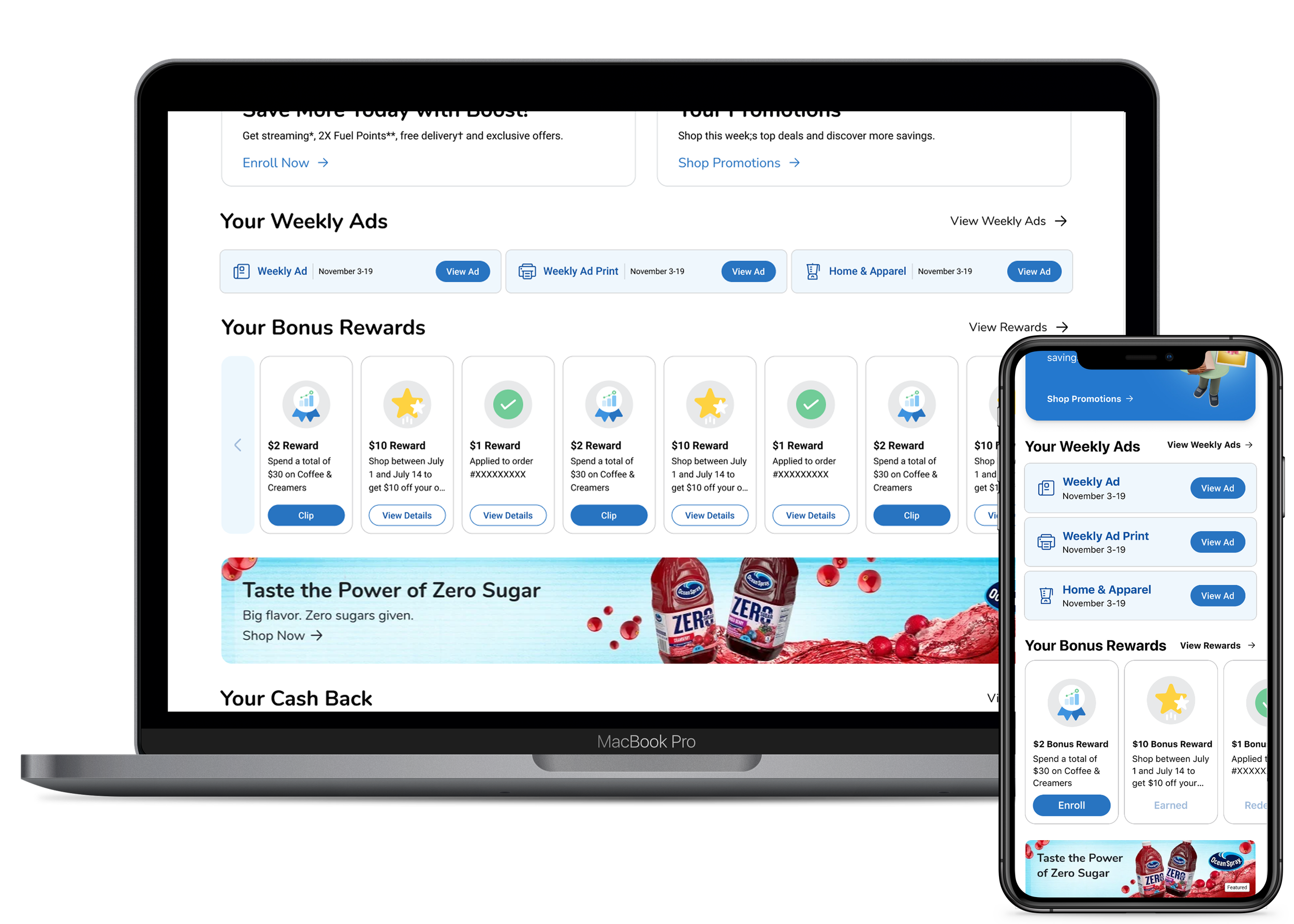
Weekly Ad Selector — Top Five Sections

The Problem

The Weekly Ad entry point from Savings Center was a static e-spot that dropped customers into the Print ad by default. Customers who wanted Shoppable or seasonal had to switch from inside the Print experience.

The Solution

Surfaced the top three current Weekly Ads inline as a Selector, giving customers direct entry to the ad they wanted.

The Impact

Shipped on iOS, Android, and Web in six weeks with every governance gate cleared on first pass and no rework.

Problem Framing

In 2024, the Customer & Loyalty team set out to define a lighthouse vision for Savings Center, Kroger's centralized destination for digital coupons, rewards, points, and promotions. I was one of four designers on that work, alongside my manager and two peers, defining how the experience would function as a single gateway to savings.

The vision came together as five pillars that guided every decision in the space:

Consolidate Savings & Rewards

One place for all savings, including digital coupons, rewards, and promotions.

Simplify the Experience

An intuitive, less overwhelming interface for customers to quickly access and use their savings.

Serve as a Gateway

Entry points into the savings available to customers, including rewards, membership, and Weekly Ad.

Increase Awareness

Educate customers on what's available, including expiring rewards, exclusive deals, and stacking opportunities.

Celebrate and Inspire Savings Behavior

Encourage customers to take advantage of savings with clear progress indicators and personalized insights.

Weekly Ad Selector was a direct expression of the third pillar. Weekly Ad needed an entry point from Savings Center that gave customers fast, intentional access to the ad they wanted.

The work had been designed as a wireframe and tested by another designer on the team. Then it sat. The original designer was at capacity. My Rewards dev team had bandwidth. I had bandwidth. I knew the space because I'd helped shape the vision the selector lived inside. We did a quick handoff and I took it to the finish line.

Original Weekly Ad Selector wireframe handed off from the previous designer, showing three stacked rows for Weekly Ad, Home and Garden, and Toys with date ranges and chevron indicators

The wireframe I picked up from another designer on the team

What It Replaced

Customers reaching the Weekly Ad from Savings Center had one path. Tap the e-spot tile and land in the Print ad. If they wanted Shoppable or a seasonal ad, they had to switch from inside the Print experience. The entry point made the choice for them.

Side by side comparison of the Weekly Ad entry point in Savings Center: current experience showing the static Your Weekly Ad and Your Promotions tiles, and final design showing the new Selector with rows for Weekly Ad and Weekly Ad Print

The Selector inverted that pattern. Customers see the current Weekly Ads at the entry point and pick the one that fits their need. The choice happens before they enter the experience, not inside it.

Design Decisions That Shaped What Shipped

Four design calls moved the work from wireframe to launch. Each addressed a different pressure point: asset pipeline timeline, ad cadence, visual hierarchy, and accessibility. I documented each as it happened, which kept governance fast and the build queue free of surprises.

1

AMP components, explored then ruled out

AMP components with images would have been the richer treatment, so I explored it per the kickoff conversation. Three constraints ruled it out.

The KCS asset pipeline was up to twenty weeks. We had six. Krojis can't be used across all Kroger divisions, so the visual treatment wouldn't be consistent for every customer. E-spots with images already lived elsewhere on the page, so adding more would have muddied visual hierarchy rather than helped it.

Documented as a future iteration once KCS timelines and division coverage catch up.

AMP component exploration showing the richer image-based treatment that was ruled out due to asset pipeline timeline
2

Top three ads, no preview

The Selector tops out at three Weekly Ads. Three is the maximum number of ad types available in any one store: Weekly Ad, Weekly Ad Print, and Home & Apparel where it's offered. Stores without Home & Apparel see two. The component holds either case without padding.

I also ruled out surfacing the preview ad. Each Tuesday, next week's Weekly Ad becomes available as a preview, so customers could potentially see it alongside the current ads. The preview shows deals they can't act on today, and the Selector is an entry point to current savings. Adding it would have padded the component with something that doesn't help anyone save right now.

Shipped Your Weekly Ads component on Savings Center showing three ad cards: Weekly Ad, Weekly Ad Print, and Home and Apparel with November 3-19 date ranges and View Ad buttons
3

Color, getting out of the white space

The first round of mocks were all white. The choice was deliberate. It matched the existing "Select Your Ad" pattern inside the Weekly Ad experience itself, which we wanted the Selector to feel coherent with.

Coherent in the ad. Lost in Savings Center.

When the all-white mock was placed inside the broader page, the Selector disappeared into the surrounding whitespace. The component that needed to hold its own as a gateway became invisible. Iterated in a C&L design jam (Ashleigh, Megan, me) on a background treatment that gave the Selector visual weight in the Savings Center context while staying coherent with the system overall.

White color exploration showing the all-white Selector that matched the in-ad Select Your Ad pattern but disappeared into Savings Center whitespace
4

Buttons that look like buttons but read as links

Accessibility office hours flagged that semantically these should be links. The action navigates the user away rather than triggering an in-page action, which is the textbook definition of link behavior.

The UI team's visual preference was buttons, because the visual weight matched the importance of the interaction.

Two reasonable positions, different vocabularies, both right. I posted the conflict in a Teams group chat I'd set up with the Shared Services partner, their manager, and mine. We flushed it out async ahead of formal review.

I worked with our Web Engineering Lead on a pattern we'd used before: visually styled as a button, semantically coded as a link. Screen readers announce it as a link and the navigation behaves like one. Sighted users see and tap a button.

This is the kind of decision that lives or dies on whether you can hold both vocabularies at once. Accessibility doesn't lose. UI doesn't lose. The customer gets the right experience either way.

Link exploration showing the alternative treatment where the action was styled as a link rather than a button, before the final visual-button semantic-link resolution

How It Moved Through Governance

Five enterprise gates stood between this work and launch: Shared Services kickoff, cross-functional design week, accessibility review, design governance, and desk checks across iOS and Android. I moved the Selector from kickoff to governance approval in nine days, then through desk checks and ship by April 2025.

Mon · 2/10

Shared Services kickoff

Oriented UI, UX Writing, and Accessibility partners to the work. Made the technical foundation call: dev readiness over the richer CMS framework that needed twenty-week assets.

Fri 2/14 to Mon 2/17

Cross-functional design week

Two threads in parallel. UX Writing scoped "Weekly Ad" vs "Weekly Ad Print" label clarity. I worked through the visual treatment with UI partner review and a C&L design jam where we caught the all-white mock disappearing into Savings Center.

Tue · 2/18

Accessibility review

Confirmed the buttons-as-links pattern. Closed screen reader grouping for the Weekly Ad block. File annotated and ready for governance.

Accessibility annotation document showing screen reader markup for the Your Weekly Ads component, with group labels for each ad card, button labels like View Ad Weekly Ad with dates, decorative alt text for icons, and a requirements note specifying that individual weekly ad cards should be programmatically made lists so screen readers announce them as 1 of 3, 2 of 3, and so on
Wed · 2/19

Design governance

Email submission after pre-aligning my UI, design, and product partners in the Teams chat. Email approval came same day, which unblocked the build. The formal Design Forum followed at its regular biweekly cadence after development had started. Nothing surfaced there because the decision-makers had already signed off async.

Tue 4/1 + Thu 4/3

Desk checks

Two passes against the built experience on iOS and Android. Caught small design polish (fills overlapping container edges, missing 8px corner radius). Follow-up confirmed the fixes landed.

Desk check artifact from April 2025 showing two rounds of QA: April 1 initial desk checks comparing design against iOS 16 Pro builds, and April 3 follow-up desk checks confirming fixes after feedback that ad container fills were missing the 8px radius

Each gate produced something the next one needed. Kickoff set the partners and the technical foundation. The design week closed the visual hierarchy question. Accessibility resolved buttons-as-links. Governance approved the decision log. Desk checks confirmed the build matched the design. No gate had to redo the work of the previous one.

What kept this fast

At the start of the project, I set up a Teams group chat with the Shared Services partner, their manager, and mine. Most decisions got flushed out there async, ahead of formal review. By the time we hit each gate, the room already knew the call. Reviews became confirmations, not debates.

Engineering tracked alongside the whole time. I used standup to keep developers in the picture on where I was, what was open, and what was changing. By the time governance cleared, there were no surprises in the build queue.

What I'd Measure

The Selector shipped April 2025 and I did not own post-launch monitoring. If I had, here's what I would have tracked and why.

Direct ad entry rate

% of Weekly Ad sessions entered through the Selector, segmented by ad type. Tests whether the Selector is actually serving as the gateway. If most customers still arrive at their preferred ad through in-ad switching, the entry point isn't doing its job.

Ad switching behavior

Frequency of customers switching ad type from inside the experience, pre vs post launch. The old pattern forced switching from inside Print. If switching stays flat, the friction got moved instead of solved.

Time to first ad view

Median time from Savings Center load to first ad-content view. Tests whether the gateway pillar from the lighthouse vision delivered on speed and intent. If it didn't get faster, the Selector worked visually but not structurally.

Each metric pairs to a hypothesis the design was built on. Knowing what you'd measure and why is half the design rigor. The other half is being honest when you didn't get to run the read.